Introduction to Gyroscope Controls
The DualShock 4's built-in gyroscope is a powerful feature that can provide precise motion-based control for mouse movement in FPS games. This technology allows for fine-tuned aiming adjustments that complement traditional analog stick controls, offering console-like precision on PC.
Understanding Gyroscope Technology
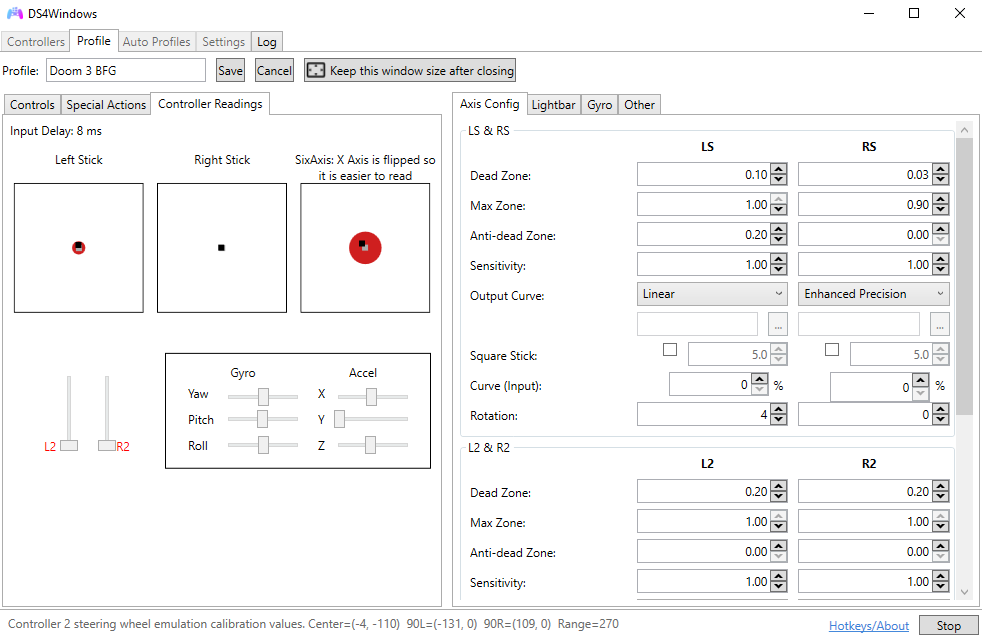
The gyroscope in the DualShock 4 detects rotational movement around three axes:
- Pitch (X-axis): Tilting forward and backward
- Yaw (Y-axis): Rotating left and right
- Roll (Z-axis): Tilting left and right
How It Works
The gyroscope measures angular velocity and converts it to mouse movement. This allows for precise, intuitive aiming that feels natural and responsive, similar to how you would aim a real weapon or camera.
Setting Up Gyroscope Controls
Configure gyroscope controls in DS4Windows for optimal FPS performance:
Basic Configuration
- Open DS4Windows: Launch the application
- Select Profile: Choose your FPS gaming profile
- Navigate to Gyro: Go to the Gyro tab
- Enable Gyro: Check "Enable Gyro Controls"
- Set Output: Choose "Mouse" as output type
Axis Configuration
Recommended Axis Settings
- Yaw (Y-axis): Primary horizontal mouse movement
- Pitch (X-axis): Primary vertical mouse movement
- Roll (Z-axis): Disabled for FPS games
Sensitivity and Calibration
Proper sensitivity settings are crucial for effective gyroscope control:
Sensitivity Settings
- Low Sensitivity (1-3): Precise aiming, requires larger movements
- Medium Sensitivity (4-6): Balanced precision and responsiveness
- High Sensitivity (7-10): Quick movements, less precision
Calibration Process
- Center Position: Hold controller in neutral position
- Start Calibration: Click "Calibrate Gyro" in DS4Windows
- Hold Still: Keep controller motionless for 3 seconds
- Complete Calibration: Wait for confirmation
- Test Movement: Verify gyroscope responds correctly
Advanced Configuration Options
Fine-tune gyroscope settings for optimal performance:
Dead Zone Settings
- Minimal Dead Zone: Maximum precision for competitive play
- Small Dead Zone: Reduces accidental movement
- Medium Dead Zone: Comfortable for casual gaming
- Large Dead Zone: Prevents drift and unwanted movement
Response Curves
- Linear: Direct 1:1 movement mapping
- Exponential: Faster response for larger movements
- Logarithmic: Slower response for larger movements
- Custom: User-defined response curve
FPS Game Optimization
Optimize gyroscope settings for different FPS game types:
Competitive FPS Games
Competitive Settings
- Sensitivity: Low (2-4) for maximum precision
- Dead Zone: Minimal to prevent drift
- Response Curve: Linear for consistent feel
- Activation: Always on or trigger-based
Casual FPS Games
Casual Settings
- Sensitivity: Medium (5-7) for comfort
- Dead Zone: Small to medium
- Response Curve: Exponential for responsiveness
- Activation: ADS (Aim Down Sights) only
Activation Methods
Choose how and when gyroscope controls activate:
Always On
- Advantages: Consistent control, no activation delay
- Disadvantages: May interfere with general movement
- Best For: Competitive players, precise aiming
Trigger-Based Activation
- Advantages: Only active when aiming, less interference
- Disadvantages: Slight activation delay
- Best For: Casual players, comfort-focused gaming
Button Toggle
- Advantages: Full control over activation
- Disadvantages: Requires manual management
- Best For: Experienced users, specific scenarios
Combining with Analog Sticks
The most effective approach combines gyroscope with analog stick controls:
Hybrid Control Strategy
- Analog Sticks: Large movements and general aiming
- Gyroscope: Fine adjustments and precision aiming
- Complementary Use: Each input method for its strengths
- Seamless Integration: Smooth transition between methods
Optimal Sensitivity Balance
- Analog Sensitivity: Medium-high for quick turns
- Gyro Sensitivity: Low-medium for precision
- Balance Testing: Adjust until both feel natural
- Game-Specific Tuning: Fine-tune per game requirements
Practice and Training
Develop muscle memory for effective gyroscope control:
Training Exercises
- Target Practice: Use aim training maps and tools
- Tracking Drills: Follow moving targets smoothly
- Flick Practice: Quick target acquisition training
- Consistency Training: Maintain steady aim over time
Progressive Training
- Start Slow: Begin with low sensitivity
- Gradual Increase: Slowly increase sensitivity
- Consistency Focus: Prioritize accuracy over speed
- Speed Development: Add speed once accuracy is consistent
Game-Specific Tips
Optimize gyroscope settings for popular FPS games:
Counter-Strike 2
- Sensitivity: Very low (1-3) for precision
- Activation: Always on or ADS only
- Focus: Headshot accuracy and spray control
Valorant
- Sensitivity: Low-medium (3-5)
- Activation: ADS for precise shots
- Focus: Crosshair placement and micro-adjustments
Apex Legends
- Sensitivity: Medium (4-6)
- Activation: Always on for tracking
- Focus: Target tracking and recoil control
Troubleshooting Common Issues
Resolve common gyroscope problems:
Drift Issues
- Recalibrate: Perform fresh calibration
- Dead Zone: Increase dead zone settings
- Surface Check: Ensure stable surface for calibration
- Temperature: Allow controller to reach room temperature
Inconsistent Response
- Battery Level: Ensure adequate battery charge
- Connection Quality: Check Bluetooth/USB connection
- Interference: Remove sources of electromagnetic interference
- Driver Updates: Update DS4Windows and system drivers
Advanced Techniques
Master advanced gyroscope techniques:
- Micro-Adjustments: Use gyro for pixel-perfect aiming
- Recoil Compensation: Counter weapon recoil with gyro
- Tracking Mastery: Smooth target following
- Flick Shots: Quick target acquisition
- Stability Training: Maintain steady aim during movement
Conclusion
Gyroscope controls offer a unique and effective way to enhance precision in FPS games. While they require practice and proper configuration, they can significantly improve your aiming accuracy and provide a more immersive gaming experience.
Start with conservative settings and gradually increase sensitivity as you become more comfortable. Remember that gyroscope controls work best when combined with traditional analog stick controls, creating a hybrid approach that leverages the strengths of both input methods.